What to do if my Meta account got hacked?
One of the biggest concerns for Social Managers is the risk of being hacked—especially if a hacker spends money on the wrong credit line.

Steps to Take When Your Meta Ad Account Got Hacked
adnomaly detects unusual activity to help prevent potential issues. The idea for adnomaly originally came from a Meta account hack, highlighting a widespread industry problem. Here’s how we address it.
- Use the "Account Hacked" option in adnomaly
If a hacker tries to spend money on an account, the setup will likely be unusual. For alerts related to Meta campaigns, you’ll find a “Was the campaign hacked?” option below the two main buttons.
To keep the campaign deactivated, select “Press here to keep the campaign deactivated” at the bottom of the notification alert.
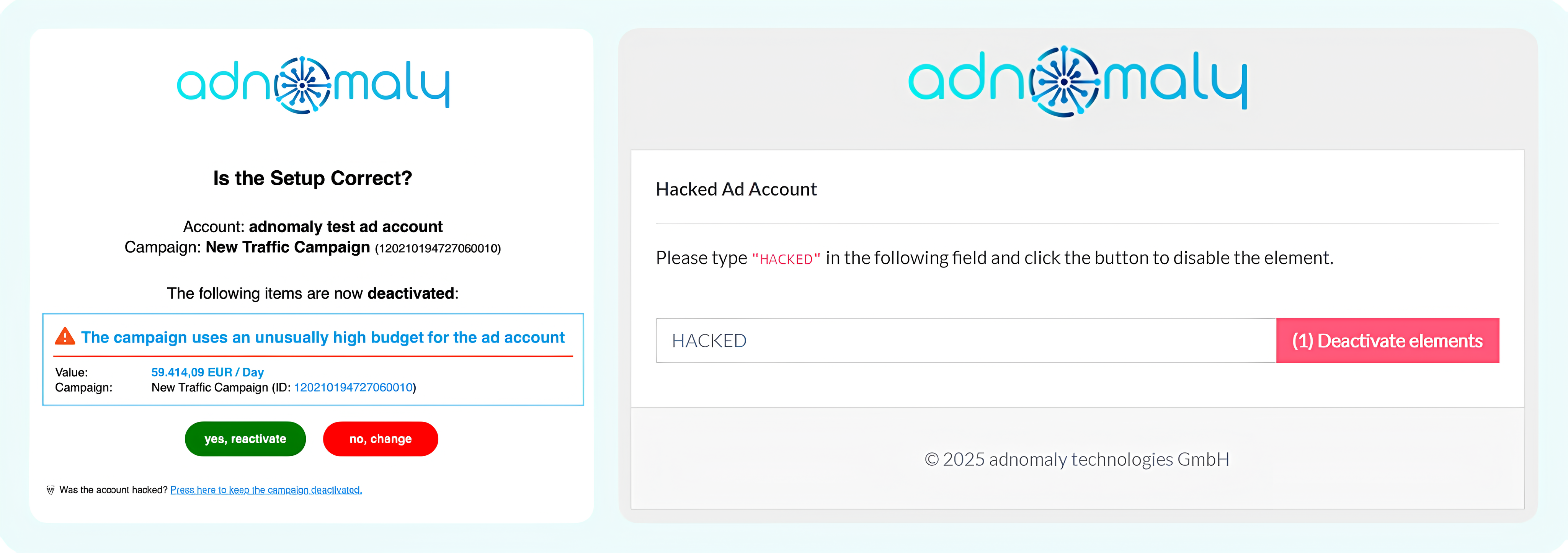
Type "HACKED" on the field to stop unauthorized activity from running ads on your account. This will ensure that all campaigns in that account remain deactivated.
- Our recommendations to strengthen your account security
- Enable two-factor authentication (2FA) for all users.
- Set up security alerts for unauthorized access.
- Adjust billing and spending limits to minimize financial risks.
- Review and remove unnecessary user access in Business Manager.
- Monitor linked devices and authorized apps for suspicious activity.
- Train your team to recognize phishing scams and security threats.
How did we do?
How to set adnomaly to send alerts without pausing my campaign?