How can I edit the ad accounts I receive alerts for after account creation?
How Can I Edit the Ad Accounts I Receive Alerts for After Account Creation?. In this guide, we will show you how to update the ad accounts you receive alerts for in the Operation Center. Follow these…
How Can I Edit the Ad Accounts I Receive Alerts for After Account Creation?
In this guide, we will show you how to update the ad accounts you receive alerts for in the Operation Center. Follow these quick steps to customize your alert preferences and stay updated on the right campaigns.
If you want to update which ad accounts you receive alerts from, simply follow these steps:
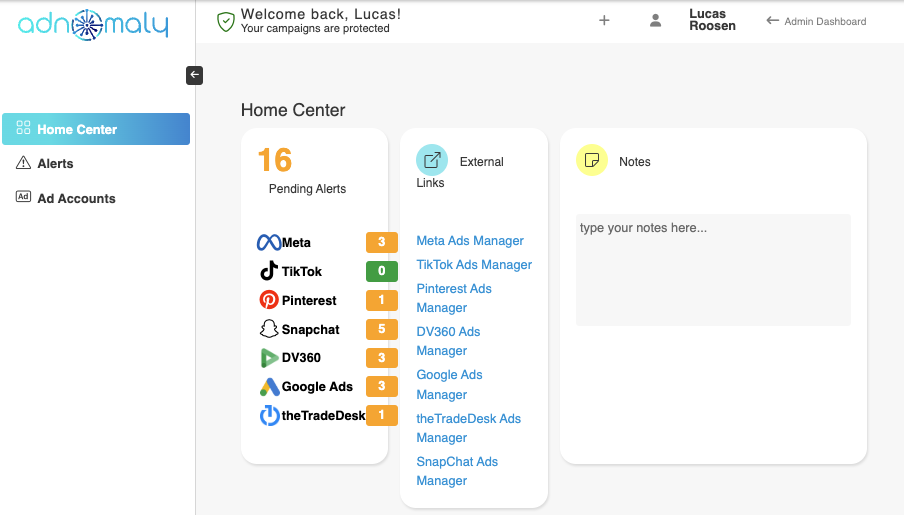
- Go to the Operation Center and Click the "+" sign in the upper left corner of the screen.
- Select the platform where the ad campaign is running.
- Find the ad accounts listed under that platform.
- Check the box next to the ad accounts you want to receive alerts for.
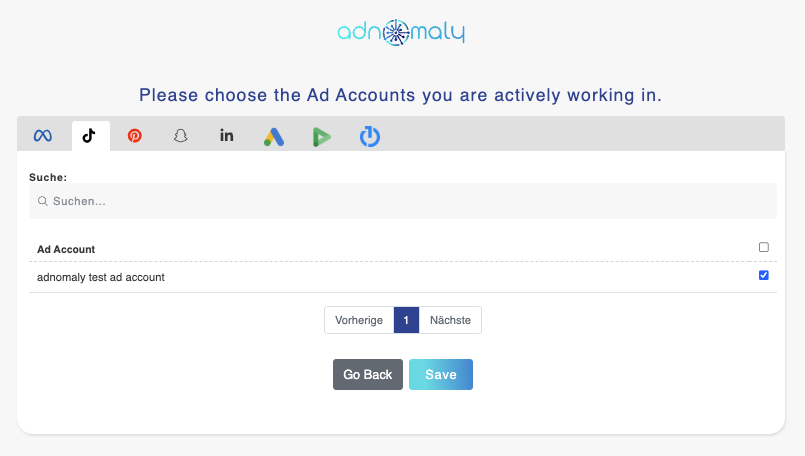
- Click "Save" to update your settings.
That's it! Your alert preferences will now be updated.
Photo will be edited. plus will be marked.
How did we do?